
Open Local Files in Chrome with One Click
Google Chrome blocks direct access to local files via links, a security measure that prevents unintended file exposure. This extension bypasses that restriction by enabling users to open local file links with a single click. Designed for developers, testers, and power users, it facilitates testing web applications that rely on local file references. The tool is particularly useful in environments where offline content or internal documentation needs quick access. Unlike older browsers such as Internet Explorer, Chrome’s default behavior can hinder workflow efficiency, making this extension a practical solution for bridging the gap. The developer did not provide additional details about the background or team behind the project. Real-world usage includes debugging web pages with embedded file links, accessing local project assets during development, or reviewing internal documents stored locally. The extension operates only in response to user-initiated actions, ensuring security is not compromised.
Key Features & Capabilities
- Local File Link Activation – Enables clicking on file:// links in web pages, which Chrome normally blocks. This allows direct access to local files without manual path entry.
- Click-Only Trigger – The extension only responds to explicit user clicks, preventing automatic file access by malicious scripts. This maintains a strong security posture.
- iframe Cross-Origin Support – Allows window.open calls from iframes across different origins, a common requirement in complex web applications.
- Privacy-First Design – No personal data is collected. All user interactions remain local, ensuring no tracking or telemetry.
- Open-Source Transparency – Full source code is available on GitHub, allowing independent review and community contributions.
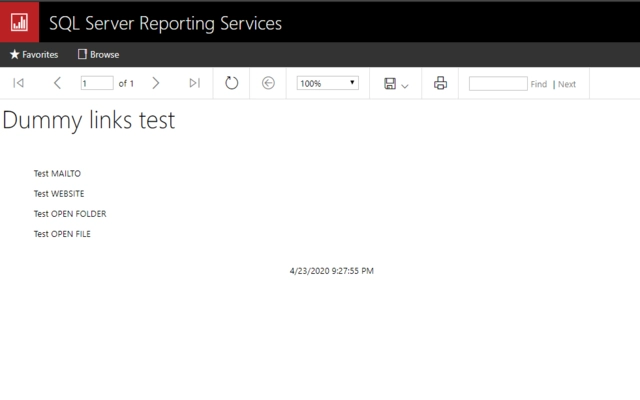
These capabilities are especially beneficial when testing web applications that reference local assets. For example, a developer can click a link to a local HTML file within a test page and immediately view the content. Similarly, a QA engineer might use it to verify that file links in a staging environment work as expected. The extension does not alter file paths or perform any background processing, ensuring predictable behavior. It serves as a lightweight utility that enhances workflow without adding complexity.
User Interface, Workflow & Performance
The extension features a minimal interface, consistent with Chrome’s extension design standards. It does not display a popup or dashboard, operating silently in the background. Users interact with it only through the browser’s action bar, where a small icon indicates its active state. Navigation is straightforward: once installed, it automatically monitors link clicks and processes file:// URLs when triggered. The workflow is seamless—clicking a local file link results in immediate file opening, with no additional steps required. Performance is optimized for low overhead; the developer did not specify resource usage details. However, given its lightweight nature and event-driven operation, it is expected to have minimal impact on CPU or RAM. Stability is maintained through strict permission controls and the absence of persistent background processes. No known conflicts with other extensions were reported.
Compatibility & System Requirements
The extension is compatible with Windows, Mac, and Linux operating systems. It supports the latest versions of Google Chrome and is designed to function across all major desktop platforms. The installation size is 1.4 MB, which is typical for a browser extension of this type. Exact system requirements were not listed. The developer did not provide specific hardware or software prerequisites. The extension does not require administrative privileges or additional runtime dependencies. It is distributed as a standard Chrome extension package, which can be installed via the Chrome Web Store or manually from a ZIP file. Platform compatibility information is limited to the supported OS list provided.
Pros and Cons
Pros
- Enables essential local file access in Chrome, improving developer workflow.
- Security-first approach with click-only activation prevents unauthorized access.
- Open-source code allows transparency and community trust.
- Minimal resource usage and no background processes.
- Free to use with no hidden costs or ads.
Cons
- Requires manual installation or Chrome Web Store access.
- Only works within Chrome; no support for other browsers.
- No visual interface or configuration options.
- Does not support file protocols beyond file://.
- Dependent on Chrome’s extension ecosystem.
FAQ Section
Is this extension safe to use?
The extension is designed with security in mind. It only responds to user-initiated clicks, preventing malicious scripts from opening local files without consent. No personal data is collected or transmitted.
Can I use this on multiple operating systems?
Yes, the extension supports Windows, Mac, and Linux, making it accessible across all major desktop platforms.
Does the extension collect user data?
No, the developer explicitly states that no personal information is collected or used. All operations occur locally within the browser.
How do I install the extension?
You can install it via the Chrome Web Store or manually by loading the unpacked extension folder. The source code is available on GitHub for advanced users.
Is this extension free?
Yes, the extension is completely free to download and use. There are no premium features or subscription models.
Final Thoughts + CTA
This extension fills a critical gap in Chrome’s default behavior, offering a secure and efficient way to access local files through clickable links. Its minimalist design, strong security model, and open-source foundation make it a reliable tool for developers and technical users. While it lacks advanced configuration options, its simplicity is a strength in high-trust environments. The absence of ads, tracking, or hidden costs further enhances its value. For anyone working with local file references in web development, this tool is an essential addition. Download Open Local Files in Chrome with One Click now.







